
HELLO Salesforce Thinkers, In our previous blog we learned about Salesforce Data Security and Access – Part 5 (Object Access) In this blog we are going to learn about “Profiles”. We will continue our learning journey by a series of blogs to go deeper and understand the Salesforce Data Security Model, Visibility and Access.
Profiles:
Profiles are a group of settings and permissions which define what a user can access in the application.
Profile is mandatory for every user in salesforce. You cannot have a user without a profile. Profile states the objects/field permissions and also other permissions with in the org.
Profile controls following –
- Object permissions (create, delete,read, edit permissions)
- Field permissions
- Record type and Page layouts
- Apps visibility and what users can do within a specific app
- View and Edit Password Policies
- Login hours can be defined
- IP address permissions
- Tab settings
- Classes, VF pages permissions
Every profile must have at least one visible app, except for profiles associated with Customer Portal users because apps are not available to them.
Types of profiles in Salesforce:
We have two types of profiles.
- Standard profiles
- Custom Profiles

Standard profiles: Salesforce provides some standard profiles with different set of permissions for each.
Salesforce provides below standard profiles, We cannot delete standard profiles.
System Administrator, Standard User, Read Only, Solution Manager, Marketing User & Contract Manager.
- System Administrator :- System administrator is the super user and can customize every application in an organization.
- Standard User :- Standard user can View, Edit and delete their own records.
- Read Only :- Can only view records.
- Solution Manager :- Solution manager can customize standard user permissions, published solutions and solutions categories.
- Marketing User :- Marketing user can import organization leads and have all standard user permissions
- Contract Manager :- Contract manager can edit, approve, activate and delete contracts and also have all standard user permissions.
Custom Profiles: We can create Custom profiles to have permissions as per our requirement. Custom Profiles can be deleted if there are no users assigned to that particular one.
Every profile belongs to exactly one user license type.
New profile should be cloned from existing profile, Instead of creating. It helps us to save time by cloning existing profiles and customizing them.
How to create profiles in Salesforce ?
Navigate To :
Setup >> Administer >> Manage users >> Profiles
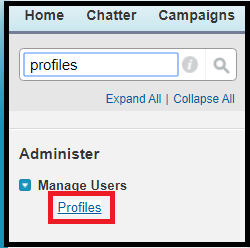
Click on New Profile Or clone an existing one.

Select an existing profile and enter the profile name-

Click on Save.
How to assign profiles to users ?
Setup >> Users

Click on New User
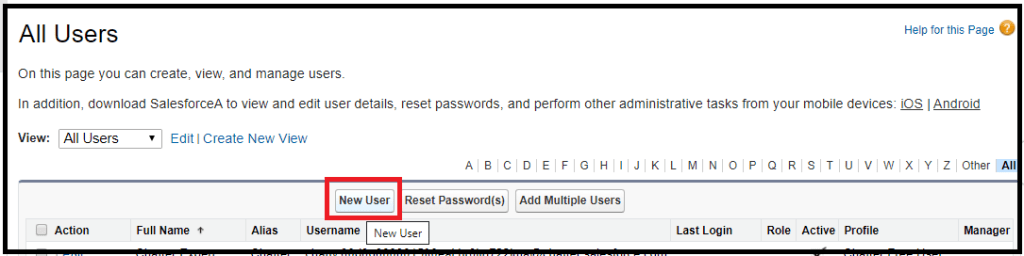
We can assign profile from the Profile drop down.

Click on Save.
Note:
A profile can be assigned to many users, but a user can be assigned a single profile at a time.
 Salesforce Thinkers